7 Critical Insights into What Solder Is Made Of: A Professional Guide to High-Reliability Lead-Free Solder for PCBA Engineers
What is solder made of and how do engineers choose the right lead free solder for PCB assembly? This

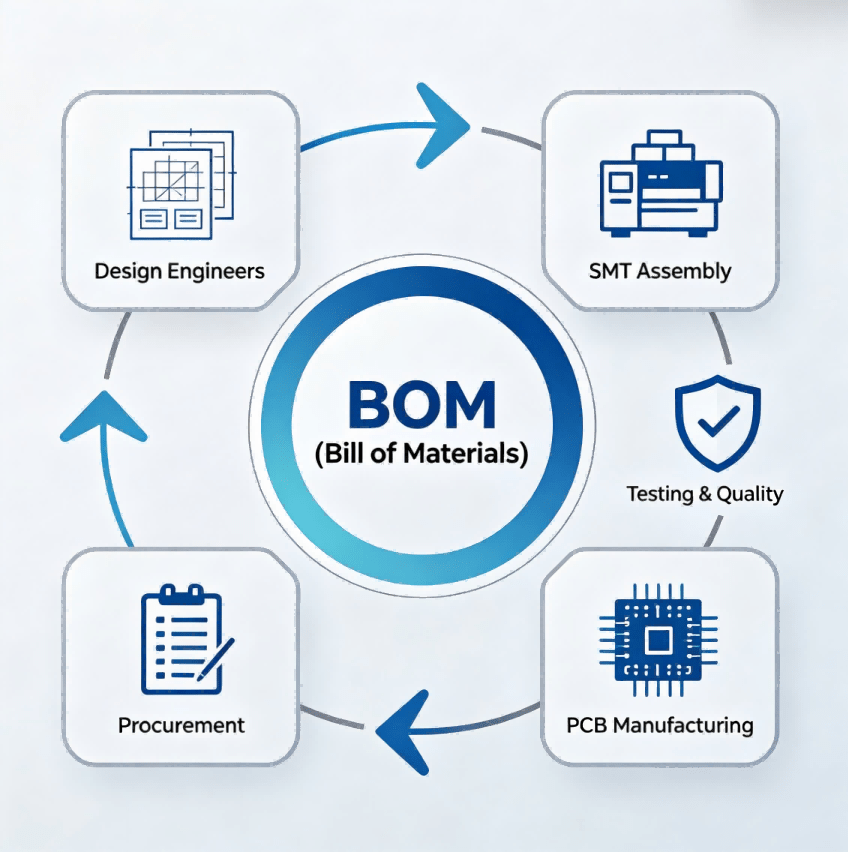
For a baker to make a cake, they need a list of ingredients — flour, butter, sugar — and the quantities of each. They also need to know which tools to use and in what order. That list, in many ways, is like a bill of materials (BOM) for the baking process.In electronics manufacturing, a BOM serves the same purpose. It is a comprehensive list of raw materials, components, sub‑assemblies, and other items required to build a printed circuit board (PCB). Manufacturers depend on the accuracy and completeness of the BOM to build a product correctly. For a PCB assembler, the BOM is the primary document that explains what components go where, how many are needed, and what specifications must be met.At Guangzhou Huachuang Precision Technology Co., Ltd. (HCJMPCBA), we see the BOM as more than a shopping list — it is the communication bridge between your design and our production line. With nearly 3,500 m² of ESD‑protected manufacturing space, multiple high-speed SMT lines, and ISO9001 quality management and ISO13485 medical device quality management certifications, we help customers turn their BOMs into reliable, high‑quality PCBA from prototype to volume production.
The Core Role Of Bom In Pcba Manufacturing
A bill of materials (BOM) is a structured document that lists every component, material, and sub‑assembly needed to manufacture a product. For PCB assembly, the BOM typically includes:
The BOM is used by multiple departments throughout the product lifecycle — design, engineering, purchasing, and manufacturing. It must be accurate, detailed, and clearly organized to ensure everyone involved understands what is required.
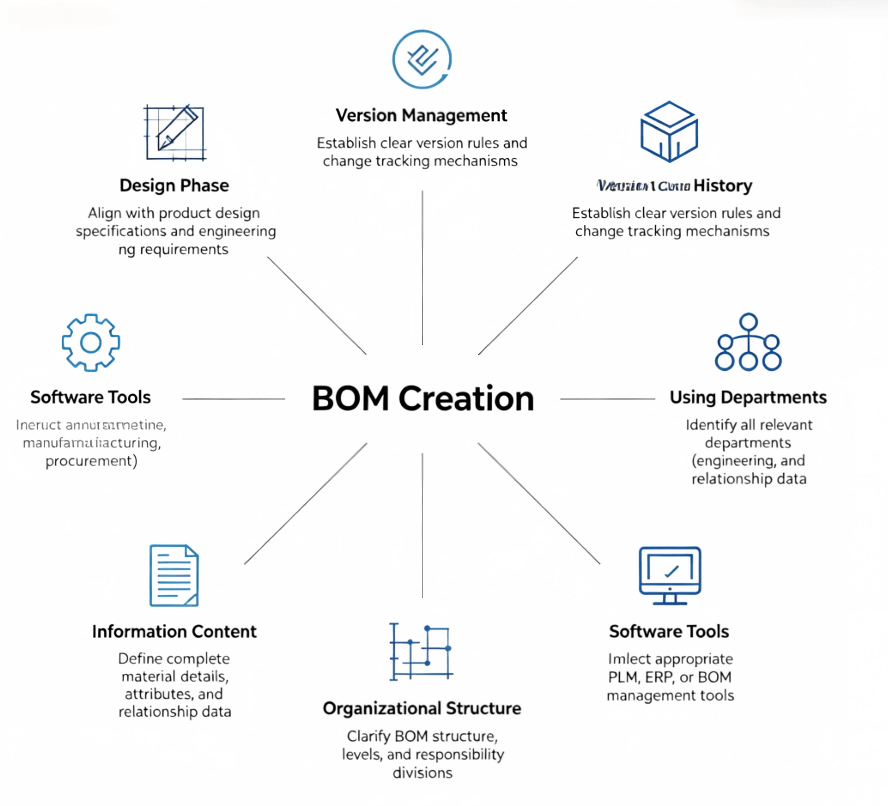
Creating a detailed BOM takes time, but skipping this step can lead to costly mistakes — especially for complex designs. Before you start, consider the following questions:1. What Are You Building?
You should have at least begun the design phase of your project before preparing a BOM. A Gerber file explains the design information to the manufacturer and helps determine what parts to include.
2. How Will You Manage Your BOM?
A BOM often goes through multiple iterations and may be handled by several people. Establish a system for version control, track changes, and limit editing access to avoid confusion.
3. Who Will Use It?
Different departments use the BOM for different purposes. Understanding who needs what information will help you include the right details.
4. What Information Will You Include?
Every BOM should include basics like part name and quantity, but other items are optional. The best practice is to make your BOM as detailed and complete as possible.
5. How Will You Organize It?
Consider how many levels and sub‑assemblies your BOM will have, how you will group items, and what designations you will use.
6. What Program Will You Use?
A BOM is essentially a spreadsheet. Many companies use Excel, but as projects grow more complex, dedicated BOM software may be more suitable.
Six Preparations Prior To Bom Creation
Once you have the groundwork in place, follow these steps to create your BOM:Step 1: Create the Document
Open your chosen program and create a new spreadsheet. Name the file and include the project name and identifying information at the top.Step 2: Organize the Document
Set up user permissions, enable change tracking, and create any levels you need.Step 3: Fill in the Columns
Populate column headers with categories such as item name, quantity, part number, and more.Step 4: Fill in the Rows
Each component gets its own row. Ensure all information is accurate and up to date.Step 5: Update as Needed
Update your BOM as project requirements change. Save frequently and keep a record of changes.
The information in a BOM for PCB assembly may vary by project, but the following categories are commonly included:Part NumberList the manufacturer’s part number for each component. This is how the assembler ensures they use the right part.Manufacturer NameInclude the component manufacturer’s name to help with sourcing. Verify availability and suitability before listing.DescriptionProvide details such as dimensions, voltage, color, and other specifications. Include units of measure consistently.QuantitySpecify the number of each part needed. Keep this information up to date to take advantage of bulk discounts.Procurement TypeIndicate whether the part is purchased off‑the‑shelf or custom‑made.Flexibility IndicatorSome parts may be substitutable; others are critical and must follow specifications exactly. Mark items as critical, important (swappable for equivalent parts), or non‑critical (generic parts with freedom to substitute).Alternate PartsIf you are flexible, list potential alternate parts in case the primary component is unavailable.BOM LevelBOMs often contain multiple levels representing the main assembly and sub‑assemblies.Supporting FilesAttach CAD files, data sheets, diagrams, and instructions that don’t fit into the spreadsheet.Reference DesignatorCreate a unique identifier for each part indicating where it goes on the board. Use the same labels as in your PCB design documents for easy cross‑reference.Package TypeDescribe the package or case type for each surface‑mount component.Placement MethodList the placement method — through‑hole or surface mount technology (SMT).Board LayerIndicate which layer of the board the component will be placed on (top, bottom, or internal layer).Points/FootprintNotate the number of connection points and the footprint (arrangement of pads or through‑holes).PhaseMark where parts are in their lifecycle — production, testing, or design.Comments and NotesInclude any additional information that doesn’t fit elsewhere.
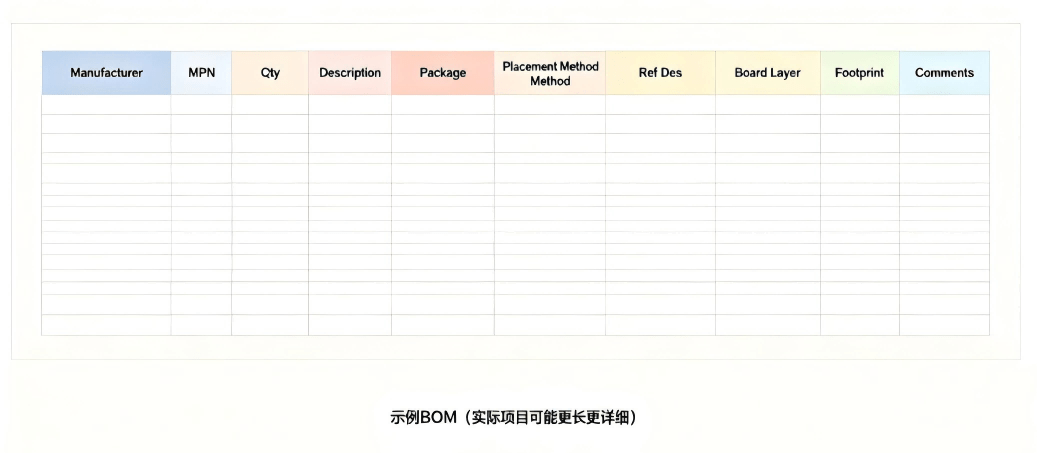
Typical Field Structure Of Bom
Here is a sample BOM showing some of the information described above:
| Manufacturer | MPN | Qty | Description | Package | Placement | Ref Des | Board Layer | Footprint | Comments |
|---|---|---|---|---|---|---|---|---|---|
| Texas Instruments | LM2596S-5.0 | 2 | 5V Step-Down Regulator | TO-263 | SMD | U1, U2 | Top | 5 pins | Critical |
| Yageo | RC0603FR-0710KL | 10 | 10kΩ ±1% Resistor | 0603 | SMD | R1-R10 | Top | 2 pads | Standard |
| Samsung | CL10B104KB8NNNC | 8 | 100nF 50V X7R Capacitor | 0603 | SMD | C1-C8 | Top | 2 pads | Standard |
| Molex | 87831-1420 | 1 | 14-pin Header | TH | Through‑hole | J1 | Top | 14 pins | Critical |
This is a simplified example BOM — your actual BOM will likely be longer and contain more information.
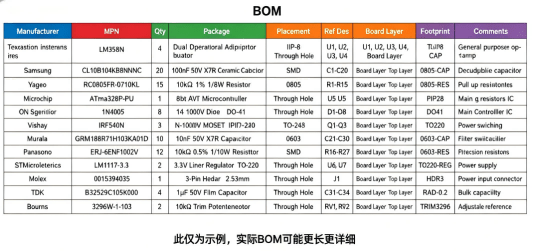
Sample Bom
Tailor Your BOM to Your NeedsDifferent projects require different organization and information. Customize your BOM according to the unique demands of your project.Use a TemplateMany PCB manufacturers and assemblers provide BOM templates you can obtain before requesting a quotation. Using a template from your assembly partner helps avoid compatibility issues.Include the Right Amount of DetailInclude as much helpful information as possible. The people building your board may have never spoken to you in person — your BOM is their primary instruction. Make it clear, detailed, and precise.Double‑Check All InformationBefore sending your BOM to a manufacturer, check it meticulously. Even small mistakes can be costly in PCB assembly.Keep Track of ChangesMaintain a system for tracking all changes to the document. Keep records of previous versions in case you need to refer back.
Missing or Incorrect Part NumbersA missing or incorrect manufacturer part number is one of the most common BOM errors. Always verify MPNs against manufacturer datasheets.Inconsistent Reference DesignatorsEnsure reference designators in your BOM match those in your PCB layout files. Inconsistencies cause confusion during assembly.Incomplete DescriptionsA vague description can lead to the wrong component being ordered. Include key specifications — value, tolerance, voltage rating, package size.No Alternate PartsWhen a component goes end‑of‑life or has long lead times, having alternate parts listed in your BOM can save weeks of delay.Forgetting ConsumablesSolder paste, flux, and other consumables may not be listed in your electronic BOM but are essential for assembly. If you have specific requirements, include them.
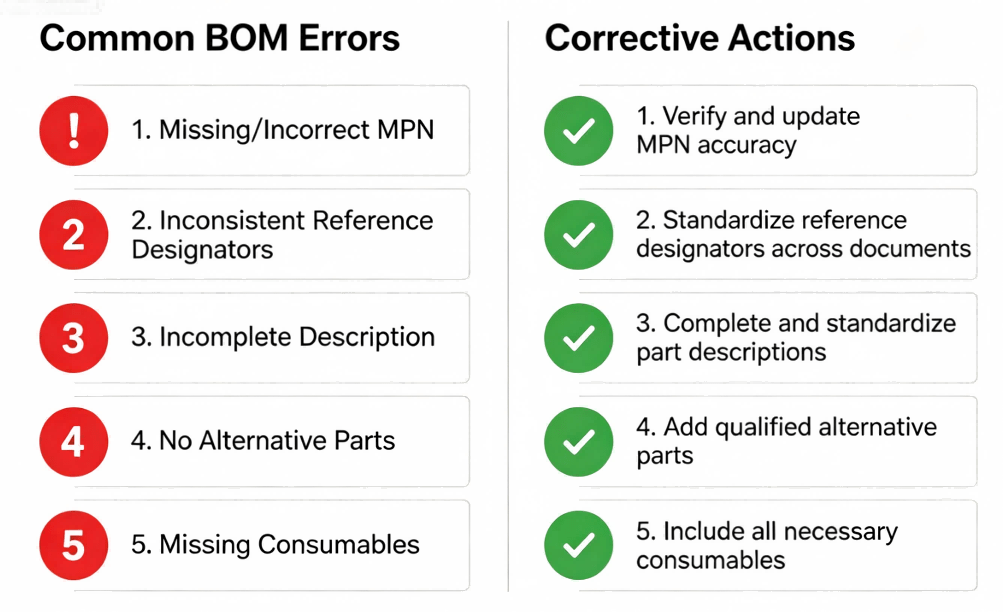
Common Bom Errors And Corrections
At Guangzhou Huachuang Precision Technology Co., Ltd. (HCJMPCBA), we understand that a well‑structured BOM is the foundation of a successful PCBA project. Our team reviews every BOM before production begins to identify potential issues:
Our ISO9001 and ISO13485 quality systems ensure that every BOM is handled with the same level of attention, whether you are ordering 50 boards or 50,000. With our intelligent MES system, we provide full component‑level traceability — so every part on your BOM can be traced from receipt through assembly to delivery.
Guangzhou Huachuang Precision Technology Co., Ltd. (HCJMPCBA) — Your PCBA partner from BOM to board.
What is solder made of and how do engineers choose the right lead free solder for PCB assembly? This

Discover what is an 8 layer pcb stackup, best layer configurations, materials, signal integrity stra
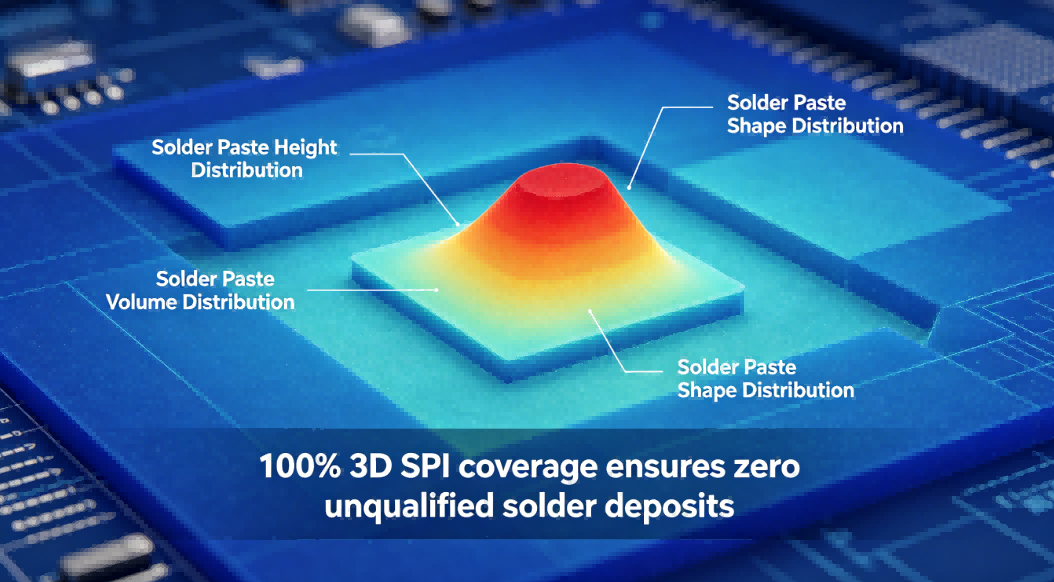
Tired of PCBA failures? Nearly 60% of soldering issues begin at stencil printing. Learn how HCJMPCBA